Introduction: Why Clients Should Not Call Every Microservice Directly
In a monolithic application, the client usually talks to one backend application.
A web app sends a request to the backend. A mobile app sends a request to the same backend. That backend may contain user logic, order logic, payment logic, inventory logic, and notification logic in one codebase.
Microservices change that shape.
Instead of one large backend, the system may be split into smaller services such as User Service, Order Service, Payment Service, Inventory Service, and Notification Service. Each service owns one business capability. If you are new to this model, start with what microservices are before going deeper into the gateway layer.
The problem is communication.
Without an API Gateway, the client may need to know the address of every backend service. A mobile app might call User Service for profile data, Product Service for catalog data, Order Service for checkout, and Payment Service for payment.
That creates practical problems:
- The client becomes coupled to internal service routes.
- Authentication and authorization may be repeated in many public services.
- The client may send too many network requests.
- API versioning becomes harder.
- More internal services are exposed to the public internet.
- Backend changes can break client applications.
This is one reason microservices need careful design. As explained in microservices vs monolithic architecture, microservices can reduce the pain of a large monolith, but they also introduce new communication and operational complexity.
An API Gateway helps by giving clients a stable way to enter the system.
Short answer: An API Gateway in microservices is a layer between client applications and backend services. It receives client requests, applies common rules such as authentication, rate limiting, and request routing, then forwards each request to the correct microservice.
What Is an API Gateway in Microservices?
An API Gateway is a server, service, or software layer that sits between clients and backend microservices.
A client is anything that sends requests to your system, such as a browser, mobile app, admin dashboard, or partner integration.
A microservice is a small backend service focused on one business capability, such as users, orders, payments, or inventory.
A backend service is a server-side service that processes requests, applies business rules, talks to databases, or communicates with other services.
The API Gateway receives requests from clients and sends them to the correct backend service. This is called request routing. For example, the gateway may send /api/users requests to User Service and /api/orders requests to Order Service.
After the API Gateway decides which backend service should handle a request, service discovery in microservices helps locate a healthy running instance of that service.
A simple analogy is a hotel reception desk.
A guest does not walk through every hallway searching for the right room. The guest goes to reception. Reception understands the request and points the guest to the right place.
The API Gateway works in a similar way. The client calls the gateway. The gateway decides where the request should go.
But the gateway is not a business service. It should not own order rules, payment decisions, pricing logic, inventory data, or customer data. Those belong inside the correct microservice.
In a typical list of components of microservices architecture, the API Gateway appears near the edge of the system because it handles incoming client traffic.
Key takeaway: The API Gateway is the front door of a microservices system. It simplifies client access without becoming the place where business rules live.
Why Microservices Need an API Gateway
A microservices API Gateway is useful because it reduces how much backend complexity is exposed to clients.
Reduce client complexity
Without a gateway, the client may need to call many services directly: User Service, Product Service, Order Service, Payment Service, and Notification Service.
That means the client must know many routes, response formats, and failure cases.
With an API Gateway, the client calls one entry point. The gateway handles routing behind the scenes.
Hide internal service structure
Backend services change over time.
You may split one service into two services. You may rename routes. You may move a feature from one service to another. If clients call services directly, those changes can break them.
An API Gateway can hide some of that internal structure.
The client may keep calling:
GET /api/orders/123Behind the gateway, that request may go to Order Service today. Later, it may involve Shipment Service or Invoice Service. The client does not need to know.
Centralize cross-cutting concerns
Cross-cutting concerns are technical tasks needed across many services.
Examples include:
- authentication
- authorization
- rate limiting
- logging
- monitoring
- SSL/TLS termination
- API versioning
Authentication checks who the user is. Authorization checks what the user is allowed to do. Rate limiting controls how many requests a client can send in a period of time.
Without a gateway, each public-facing service may repeat these tasks. That leads to duplicated logic and inconsistent behavior.
Reduce repeated logic
If every public service checks API keys, validates tokens, writes access logs, and enforces limits, the system becomes harder to keep consistent.
An API Gateway can handle many edge-level concerns once before requests reach services.
Support API evolution
Public APIs change over time.
A gateway can help route versioned APIs such as:
/v1/orders
/v2/orders
This lets old clients keep using an older API while newer clients use a newer version.
To see where the gateway fits visually, compare it with a full microservices architecture diagram.
Key takeaway: An API Gateway is useful when clients need stable access while backend services continue to change independently.
API Gateway Architecture Diagram
The API Gateway architecture usually places the gateway between external clients and internal backend services.
Clients call the gateway. The gateway routes requests to services. Each service can own its own database. The gateway should not directly own service data.
Clients call one API Gateway, and the gateway routes each request to the correct microservice.
This diagram shows a simple microservices system.
The Web App, Mobile App, and Admin Dashboard call the API Gateway. The gateway then routes each request to the correct service.
For example:
- user profile requests go to User Service
- order requests go to Order Service
- payment requests go to Payment Service
- inventory requests go to Inventory Service
- notification requests go to Notification Service
Each service can own its own database. This matters because the gateway should not reach into service databases directly. Data ownership should stay with the service that owns the business capability.
For a broader view of service boxes, databases, and communication paths, see this microservices architecture diagram.
API Gateway Request Flow
The API Gateway request flow is the path a request follows from the client to the correct backend service and back.
A simple request flow looks like this:
- Client sends request to API Gateway.
- Gateway receives the request.
- Gateway checks authentication or API key.
- Gateway applies rate limits or validation rules.
- Gateway matches the route, such as
/api/orders. - Gateway forwards the request to the correct service.
- The service processes the request.
- The service returns a response.
- The gateway logs, transforms, or aggregates the response if needed.
- The gateway sends the final response back to the client.
Route examples:
GET /api/users/123→ User ServiceGET /api/products/55→ Product ServicePOST /api/orders→ Order ServicePOST /api/payments→ Payment Service
This is the core of microservices request routing. The client asks for a public API route. The gateway maps that route to an internal service.
A client request enters the API Gateway, passes common checks, routes to a backend service, and returns through the gateway.
The diagram shows that the gateway can do more than forward traffic. It can check access, apply limits, match routes, and return the final response.
Still, the service should do the business work. If the request creates an order, the Order Service should handle order rules. If the request charges a card, the Payment Service should handle payment rules.
Key takeaway: The API Gateway controls how requests enter the system. Backend services still own the actual business behavior.
Common Responsibilities of an API Gateway
API Gateway responsibilities should stay focused on edge-level concerns.
Request routing
Request routing sends each incoming request to the right service.
Example:
/api/orders   → Order Service
/api/users    → User Service
/api/payments → Payment Service
Routing can be based on path, HTTP method, headers, domain, or API version.
Authentication and authorization
The gateway may check whether a request has a valid token, session, or API key before forwarding it.
Authentication answers: “Who is this user?” Authorization answers: “Is this user allowed to do this?”
For example, the gateway may reject an unauthenticated order request before it reaches Order Service.
Rate limiting and throttling
Rate limiting protects backend services from abuse or traffic spikes.
For example, a gateway may allow a client to send 100 requests per minute. If the client sends more than that, the gateway can reject or slow down extra requests.
SSL/TLS termination
SSL/TLS is the encryption behind HTTPS.
An API Gateway may handle HTTPS connections from clients, then forward traffic internally to services. This can simplify certificate handling and centralize edge security.
Request and response transformation
Sometimes the gateway adjusts headers, request formats, or response shapes.
For example, it may add a request ID header so logs can be traced across services. Use this carefully. Too much transformation makes debugging harder.
API versioning
The gateway can route different API versions:
/v1/orders
/v2/orders
This helps older clients continue working while newer clients move to a newer API.
Request aggregation
Request aggregation means the gateway calls multiple services and returns one combined response.
For example, a product page may need product details, inventory status, and reviews. Aggregation can reduce client round trips, but too much of it can turn the gateway into a heavy orchestration layer.
Logging, monitoring, and tracing
The gateway is a good place to collect edge-level data such as request count, response time, error rate, route usage, and request IDs.
Tracing helps follow one request as it moves through different services.
Caching
Caching stores repeated responses for a short time.
A public product catalog response may be cached to reduce backend load. User-specific, payment, and checkout data need more careful handling.
Key takeaway: A good API Gateway handles routing, security, limits, and visibility at the edge. Keep domain decisions inside services.
What an API Gateway Should Not Do
An API Gateway should stay thin.
Avoid putting these inside the gateway:
- Core business logic.
- Order total calculations.
- Payment approval rules.
- Inventory reservation rules.
- Service database ownership.
- All internal service-to-service communication.
- Workarounds for poor service boundaries.
Business rules belong inside the correct microservice.
Order rules belong in Order Service. Payment rules belong in Payment Service. Inventory rules belong in Inventory Service. The gateway may route the request, check access, and apply limits, but it should not own those decisions.
A service mesh is an infrastructure layer that manages service-to-service communication inside a distributed system. It is different from an API Gateway because it focuses more on internal traffic between services.
The future API Gateway pattern article can go deeper into gateway aggregation, Backend for Frontend, and multiple gateway designs. For this article, the main rule is simple: use the gateway for edge concerns, not domain ownership.
A gateway becomes risky when routing, authentication, order rules, payment rules, and discount logic all live in one place.
This design is risky because the gateway is no longer just protecting and routing traffic. It is making business decisions for several domains.
That slows teams down. Every service change may require gateway changes. It also makes the gateway harder to test, deploy, scale, and debug.
Key takeaway: The gateway should protect and route requests. It should not become the central place where the business system lives.
API Gateway Example in an E-commerce App
A practical API Gateway microservices example is an e-commerce app.
A user opens a mobile shopping app, views a product, and places an order.
Product page request
The client calls:
GET /api/products/123The API Gateway receives the request and routes it to Product Service.
Product Service returns product data such as name, description, images, price, and availability. The mobile app does not need to know how the product backend is organized internally.
Order request
The user places an order.
The client calls:
POST /api/ordersThe API Gateway authenticates the user and routes the request to Order Service.
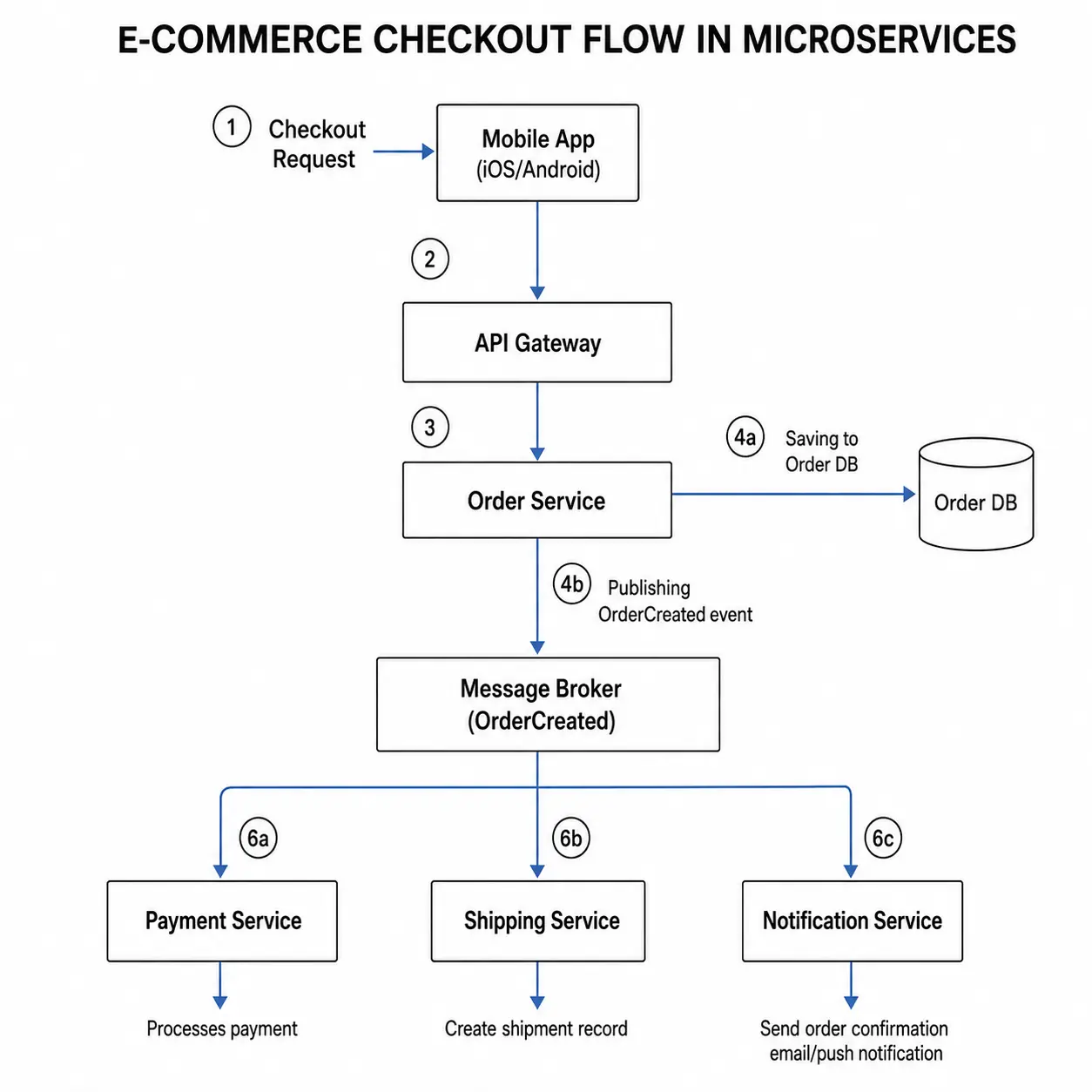
Order Service creates the order and coordinates with other services as needed. Payment Service handles payment. Inventory Service reserves stock. Notification Service sends confirmation.
The gateway helps because routing is centralized, security rules stay consistent, and internal services can change without breaking the app.
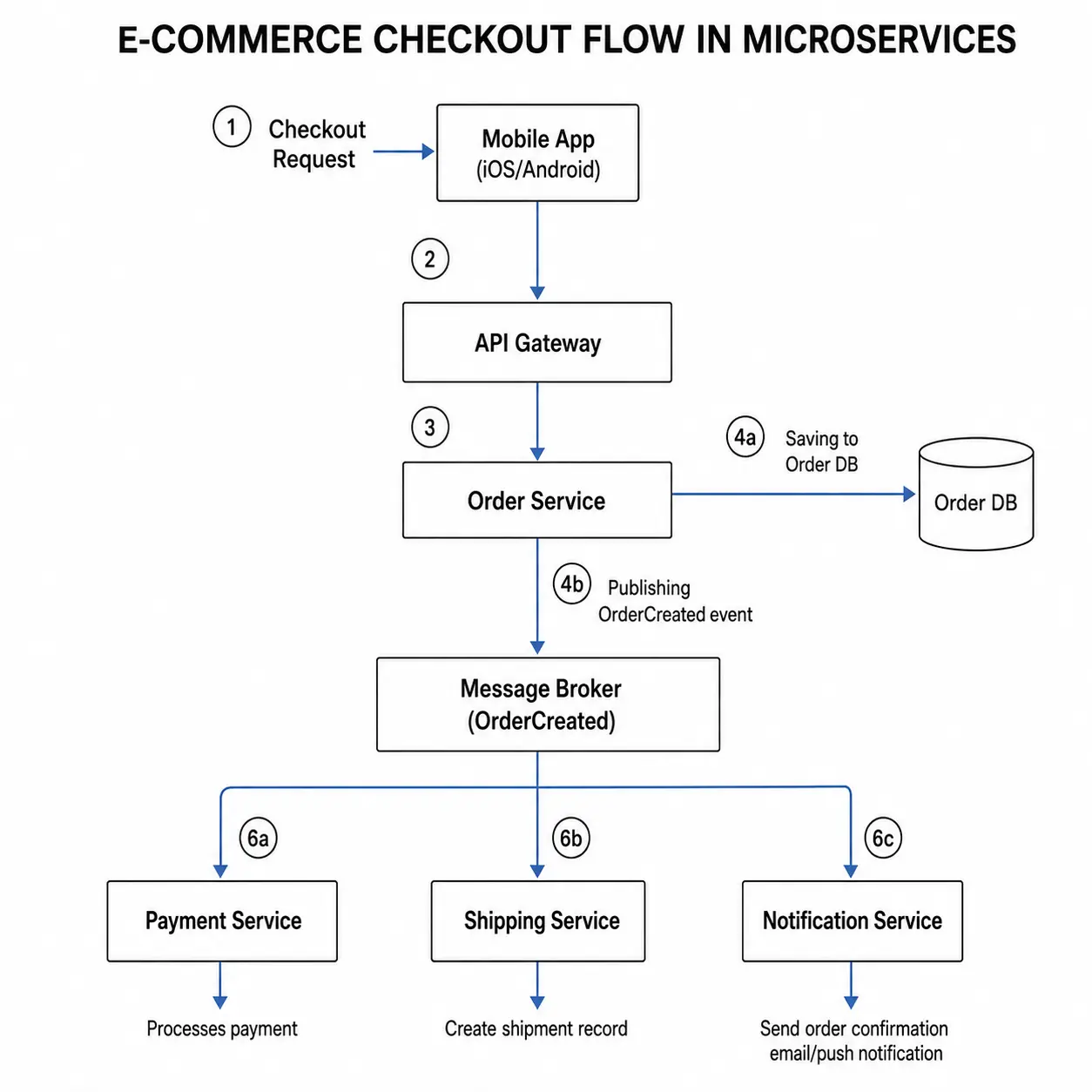
In an e-commerce app, the API Gateway routes product, order, payment, inventory, and notification requests to the right service.
The diagram shows the gateway as a routing layer. The mobile app sends requests to one place. The gateway sends each route to the correct service.
API Gateway vs Direct Client-to-Service Calls
Direct client-to-service calls mean the client talks to backend services without a gateway in front of them.
This can work for small systems. If you have one or two backend services and one internal client, direct calls may be enough.
As the number of services grows, direct calls become harder to manage. The client starts to know too much about the backend: service addresses, route rules, response formats, and sometimes different authentication behavior.
An API Gateway moves that client-facing complexity into a controlled layer.
Direct client-to-service calls expose more service details to the client, while an API Gateway gives the client one stable entry point.
| Area | Direct client-to-service calls | API Gateway |
|---|---|---|
| Client complexity | High | Lower |
| Service exposure | Many public endpoints | One main entry point |
| Security duplication | Repeated in many services | Centralized at the edge |
| Network round trips | Often more | Can be reduced |
| Service refactoring | Can break clients easily | Gateway can hide internal changes |
| Best for | Small/simple systems | Larger systems with many services |
The gateway does not remove all complexity. It puts client-facing complexity in one place where it can be managed more deliberately.
API Gateway vs Load Balancer
A load balancer distributes traffic across multiple instances of the same application or service.
For example, if you run three API Gateway instances, a load balancer can spread traffic across those instances.
An API Gateway understands API-level concerns. It can route /api/orders to Order Service, check authentication, enforce rate limits, and apply API versioning.
A load balancer focuses more on traffic distribution and availability.
A common production flow looks like this:
Client → Load Balancer → API Gateway instances → Services| Area | API Gateway | Load Balancer |
|---|---|---|
| Main job | API routing and edge policies | Distribute traffic across instances |
| Understands API routes | Yes | Usually limited |
| Handles auth/rate limits | Often yes | Usually no |
| Common use | Client API entry point | Availability and traffic distribution |
So API Gateway vs load balancer is not always an either-or decision. Many systems use both.
API Gateway vs Reverse Proxy
A reverse proxy receives client requests and forwards them to backend servers.
An API Gateway is often a more API-aware reverse proxy. It may forward requests, but it usually adds API-specific behavior such as authentication, authorization, rate limiting, API versioning, request transformation, and analytics.
| Area | Reverse Proxy | API Gateway |
|---|---|---|
| Main job | Forward requests to backend servers | Manage API traffic to backend services |
| API policies | Basic or limited | Common feature |
| Auth and rate limits | Possible | Common responsibility |
| Request transformation | Sometimes | Common in API systems |
| Best fit | General web traffic forwarding | Public API entry point for services |
The difference is not always strict. Some tools can act as both. The practical difference is that an API Gateway is designed around APIs, clients, routes, and policies.
API Gateway vs Service Discovery
Service discovery helps services find healthy service instances dynamically.
In a small system, the gateway might know a fixed address for each backend service. In a larger system, service instances may come and go. A service may have five running instances now and eight later. Some may fail health checks.
A service registry tracks available service instances. The API Gateway can use service discovery to find the right healthy instance before forwarding a request.
| Area | API Gateway | Service Discovery |
|---|---|---|
| Main job | External entry and request routing | Find healthy service instances |
| Used by clients directly | Usually yes | Usually no |
| Handles public API routes | Yes | No |
| Tracks service instances | Not by itself | Yes |
| Works together? | Yes | Yes |
API Gateway handles the external entry point. Service discovery helps locate where services are currently running.
The topic service discovery in microservices deserves its own article because it explains service registries, dynamic instances, health checks, and how services find each other.
API Gateway vs Service Mesh
API Gateway and service mesh solve different communication problems.
An API Gateway usually handles north-south traffic: traffic coming from outside the system into backend services.
A service mesh usually handles east-west traffic: service-to-service communication inside the system.
| Area | API Gateway | Service Mesh |
|---|---|---|
| Main traffic type | External client to services | Service-to-service |
| Common position | Edge of the system | Inside the service network |
| Main focus | Public API traffic | Internal service traffic |
| Used together? | Often in larger systems | Often in larger systems |
Larger systems may use both. This article stays focused on the gateway, not Istio, Linkerd, Envoy, or Kubernetes.
Benefits of API Gateway in Microservices
An API Gateway can make a microservices architecture easier to expose and operate.
Main benefits include:
- Simpler client API: clients call one public API layer instead of many backend services.
- Reduced client-service coupling: backend services can change internally with less impact on clients.
- Centralized security: authentication, authorization, API keys, and common checks can be handled at the edge.
- Consistent rate limiting: traffic limits can be applied before requests reach backend services.
- Better observability: the gateway can collect request logs, response times, route usage, and error rates.
- Easier API versioning: public API versions can be managed in one place.
- Smaller public attack surface: internal services do not all need to be exposed publicly.
- Better support for multiple clients: web, mobile, admin, and partner APIs can use gateway routes designed for their needs.
The main benefit is control. The gateway gives you one place to manage how external clients enter the system.
Challenges and Risks of API Gateway
An API Gateway helps, but it also adds responsibility.
Single point of failure
If every client request goes through one gateway and that gateway fails, the system becomes unavailable to clients.
Production systems avoid this by using multiple gateway instances, health checks, failover, monitoring, and often a load balancer in front of the gateway.
Performance bottleneck
The gateway can become a bottleneck if it does too much work.
Routing and token checks are normal. Heavy aggregation, large transformations, and domain logic can slow the system.
Extra network hop
A gateway adds another hop between the client and the service.
That can add latency. In many systems, the trade-off is acceptable because the gateway simplifies security, routing, and client communication. Still, measure it.
Gateway becoming a monolith
If many business rules move into the gateway, it becomes a centralized application that too many teams depend on.
That makes the system harder to change and harder to scale.
Operational complexity
Gateway rules must be managed carefully.
Routes, authentication policies, API versions, certificates, rate limits, and deployments all need ownership. A small mistake in the gateway can affect many services.
Common API Gateway Mistakes
Here are common mistakes to avoid.
-
Putting business logic in the gateway Keep domain decisions inside the correct service.
-
Routing every internal service-to-service call through the gateway The gateway is usually for external client traffic, not every internal call.
-
Using one huge gateway for every client and business domain A single gateway can become too large if boundaries are not clear.
-
Not making the gateway highly available If the gateway is the entry point, it needs redundancy and health checks.
-
Not monitoring latency and error rates Gateway problems affect many clients. Track request time, status codes, timeouts, and failed routes.
-
Overusing request aggregation Aggregation can help clients, but too much aggregation turns the gateway into an orchestration layer.
-
Exposing internal service details through public routes Public APIs should be stable and client-friendly.
-
Ignoring API versioning Breaking API changes can break older clients.
-
Treating API Gateway as a replacement for good service design The gateway cannot fix unclear service boundaries.
When You May Not Need an API Gateway
An API Gateway is useful, but it is not required for every system.
You may not need one when:
- you have a small MVP
- you have one backend service
- you have a simple monolith
- you have a small internal app
- your team is still validating product-market fit
- the gateway adds more complexity than value
Architecture should solve real problems.
If the client calls one backend and the system is simple, adding a gateway may only create more configuration, deployment work, and failure points.
A gateway becomes more useful when you have multiple services, multiple clients, public APIs, shared security rules, traffic limits, or frequent backend changes.
Do not add it because a diagram says every microservices system needs one. Add it when it removes more complexity than it creates.
API Gateway Best Practices
Good API Gateway best practices are mostly about keeping the gateway useful without letting it grow too large.
-
Keep the gateway thin Use it for routing, edge security, limits, and API policies.
-
Use it for edge concerns, not core domain logic Business rules should stay inside services.
-
Make it highly available Run multiple instances and use health checks.
-
Monitor latency, throughput, and error rates The gateway is on the critical request path.
-
Use clear route naming Public routes should be predictable and easy to understand.
-
Version APIs intentionally Use versions when changes can break clients.
-
Automate gateway configuration Manual route changes become risky as the system grows.
-
Use service discovery when service instances are dynamic If services scale up and down, the gateway needs a reliable way to find them.
-
Document public APIs Clients should not guess how to use the system.
-
Avoid routing all internal communication through it Internal service communication may need direct calls, messages, or a service mesh.
-
Test gateway rules before production A small route mistake can affect many users.
The best API Gateway is predictable: clear routes, clear policies, good monitoring, and minimal domain behavior.
Common API Gateway Tools
Common API Gateway tools include NGINX / NGINX Plus, Kong Gateway, Apache APISIX, Tyk, AWS API Gateway, Azure API Management, Spring Cloud Gateway, Ocelot for .NET, and Envoy-based gateways.
This article is not a tools comparison. The right tool depends on your cloud platform, team skills, traffic needs, security requirements, deployment style, and whether your system runs on virtual machines, containers, Kubernetes, or managed cloud services.
Choose the architecture first. Then choose the tool that fits it.
FAQ
1. What is an API Gateway in microservices?
An API Gateway in microservices is a layer between client applications and backend services. It receives client requests, applies common rules, and routes each request to the correct microservice.
2. Why is API Gateway used in microservices?
An API Gateway is used to reduce client complexity, centralize edge concerns, hide internal service structure, route requests, and protect backend services with policies such as authentication and rate limiting.
3. Is API Gateway required for microservices?
No. An API Gateway is not always required. Small systems, MVPs, internal apps, and simple backends may not need one. It becomes more useful when the system has many services, many clients, or shared security and routing needs.
4. Should business logic be inside an API Gateway?
No. Business logic should live inside the correct microservice. The gateway can handle routing, authentication, rate limits, and API policies, but it should not own domain rules.
5. Can an API Gateway become a bottleneck?
Yes. An API Gateway can become a bottleneck if all traffic passes through it and it does too much work. Keep it thin, run multiple instances, monitor latency, and avoid heavy logic inside it.
6. Is API Gateway a single point of failure?
It can be if there is only one gateway instance. Production systems usually avoid this by running multiple gateway instances, using load balancing, health checks, failover, and monitoring.
7. What is the difference between API Gateway and load balancer?
An API Gateway manages API-level concerns such as routing, authentication, rate limiting, and versioning. A load balancer distributes traffic across multiple instances. Many systems use both together.
8. What is the difference between API Gateway and service discovery?
An API Gateway handles external entry and request routing. Service discovery helps locate healthy service instances dynamically. The gateway may use service discovery to find where a backend service is currently running.
Conclusion
An API Gateway is the front door of a microservices architecture.
It gives clients a stable way to reach backend services, routes requests to the right place, and centralizes cross-cutting concerns such as authentication, authorization, rate limiting, logging, monitoring, and API versioning.
But it should stay focused.
The gateway should not become the owner of business rules, service databases, or internal service design. If too much logic moves into the gateway, it becomes a bottleneck and starts to look like a mini-monolith.
For larger systems with many services and clients, an API Gateway can make the architecture easier to understand and operate. For small apps, MVPs, or simple monoliths, it may add more complexity than value.
The next logical topic is service discovery in microservices, because once a gateway knows which service should handle a request, it often needs a dynamic way to find healthy service instances.