A microservices architecture diagram is a visual map that shows how independent services, APIs, databases, clients, and communication patterns work together inside a distributed application.
If you are new to the architecture itself, begin with What Are Microservices? A Simple Explanation for Beginners.
For software engineers and system architects, understanding a microservices architecture diagram is important because it explains how requests move through the system, how services remain separated, and how data flows between business capabilities.
Instead of showing an application as one large block, a microservices diagram breaks the system into smaller services such as user management, orders, payments, inventory, and shipping.
Each service owns a specific responsibility and controls its own data boundary. When service boundaries and operational practices are designed well, this structure can make parts of the system easier to scale, deploy, maintain, and evolve independently.
What Is a Microservices Architecture Diagram?
A microservices architecture diagram is a system design diagram that represents an application as a collection of small, independent services.
Each service performs a focused business function and communicates with other services using APIs, events, or message brokers.
In a typical diagram, clients such as mobile applications or web browsers send requests through a system entry point, often an API Gateway. The gateway routes those requests to the appropriate microservices.
Each microservice may control its own database, schema, or other isolated data store. Some services may also publish and consume events through tools such as Kafka, RabbitMQ, or a cloud-based message broker.
The purpose of the diagram is to make the system understandable before developers write, deploy, or modify the underlying code.
Why Microservices Architecture Diagrams Matter
Microservices systems can quickly become complex. A clear diagram helps teams understand how services interact, where data is stored, and which communication style is being used.
A good microservices architecture diagram helps with:
- Explaining the system to developers, architects, and stakeholders
- Planning new features before implementation
- Identifying service boundaries
- Avoiding tightly coupled services
- Understanding synchronous and asynchronous communication
- Debugging failures across distributed systems
- Designing e-commerce, SaaS, and enterprise platforms
- Documenting architecture decisions for future teams
- Reviewing service dependencies before scaling
- Onboarding engineers into an existing platform
Without a diagram, teams can lose visibility into how the system actually works.
This can lead to unclear ownership, duplicated logic, unnecessary service dependencies, direct database access between services, and fragile distributed workflows.
The Anatomy of a Microservices Architecture Diagram
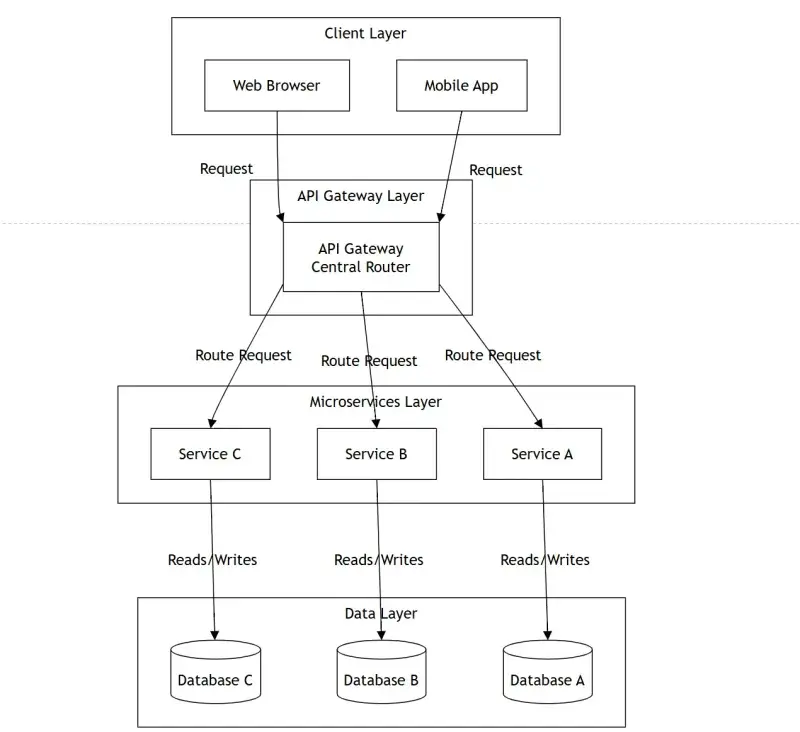
A high-level microservices architecture diagram often contains four main layers:
- Client layer
- Entry and routing layer
- Microservices layer
- Data layer
| Layer | Main Role | Common Components | Purpose |
|---|---|---|---|
| Client Layer | Sends requests to the system | Mobile App, Web Browser, Desktop App, Third-Party Client | Represents users or external systems interacting with the application |
| Entry and Routing Layer | Routes and controls incoming requests | API Gateway, Ingress, Load Balancer, Authentication Middleware | Provides a controlled entry point and forwards requests to services |
| Microservices Layer | Handles business capabilities | User Service, Order Service, Payment Service, Inventory Service | Divides the application into independently owned services |
| Data Layer | Stores service-controlled data | User Data, Order Data, Product Data, Payment Data | Gives each service ownership and control of its data boundary |
This layered view separates user access, routing, business logic, and data ownership into clear visual areas.
The diagram is a logical view of the architecture. It does not necessarily show every physical server, container, database instance, or deployment environment.
Client Layer in a Microservices Architecture Diagram
The client layer represents the applications or external systems that interact with the platform.
Examples include:
- Mobile applications
- Web browsers
- Desktop applications
- IoT devices
- Partner integrations
- Public API consumers
- Administrative dashboards
In many microservices systems, clients do not communicate directly with every internal service.
Instead, requests usually go through an API Gateway, ingress controller, backend entry service, or another controlled routing layer.
For example, a mobile application may send a request to view a shopping cart. The request reaches the system entry point, which determines which backend service should handle it.
This prevents the mobile application from needing to know:
- The internal address of every service
- The deployment location of each service
- How many instances of a service are running
- Which team owns the service
- Whether the backend has been reorganized
The client receives a stable public interface while the internal architecture can evolve behind it.
API Gateway Layer in Microservices Architecture
The API Gateway in microservices can act as the main entry point into a microservices system.
It receives requests from clients and routes them to the appropriate backend service.
An API Gateway may also handle:
- Authentication
- Authorization
- Rate limiting
- Request routing
- TLS termination
- Response aggregation
- Access logging
- API versioning
- Request and response transformation
- Correlation or trace identifiers
For example, when a user opens an e-commerce application, the gateway may route:
- Cart requests to Cart Service
- Product requests to Catalog Service
- Order requests to Order Service
- Profile requests to User Service
Without a gateway or another controlled entry layer, clients may need to call several internal services directly.
That can increase client complexity and expose too much of the internal service structure.
An API Gateway is common, but it is not mandatory in every microservices system. A small internal platform may use another entry mechanism or direct calls when the architecture remains simple.
Microservices Layer: Independent Services
The microservices layer contains the core business services of the application.
Each service is responsible for one meaningful business capability.
Examples include:
- User Service for accounts and user profiles
- Cart Service for shopping-cart operations
- Catalog Service for product information
- Inventory Service for stock availability
- Order Service for order creation and order history
- Payment Service for payment processing and refunds
- Shipping Service for fulfillment and delivery workflows
- Notification Service for email, SMS, and push notifications
Each service should have a clear ownership boundary.
Where practical, a service should be independently deployable. This means a team can update, scale, or repair that service without requiring the entire application to be redeployed.
A strong architecture diagram should make service boundaries easy to recognize.
If every service depends directly on every other service, shares the same data structures, and must be deployed together, the system may be distributed physically while still behaving like a tightly coupled monolith.
Data Layer: Database per Service Pattern
In microservices architecture, each service should generally own and control its own data.
This approach is commonly called the database-per-service pattern.
Separate ownership may be implemented through:
- Independent databases
- Separate schemas
- Separate collections
- Dedicated tables with controlled access
- Other isolation mechanisms appropriate to the system
For example:
- User Service controls User Data
- Order Service controls Order Data
- Inventory Service controls Inventory Data
- Payment Service controls Payment Data
The important principle is ownership, not necessarily one physical database server for every service.
One service should not freely read or modify another service’s private data.
If Payment Service needs order information, it should normally obtain it through:
- An Order Service API
- An event published by Order Service
- A replicated read model
- A controlled data-synchronization mechanism
This separation reduces coupling and allows services to change their internal data models more independently.
It may also allow different services to use different storage technologies when there is a genuine technical reason.
For example:
- Order Service may use a relational database for transactional order records.
- Catalog Service may use a document database for flexible product attributes.
- Search Service may use a search index for fast text queries.
- Analytics workloads may use a separate reporting store.
Database per service introduces trade-offs, including eventual consistency, cross-service reporting, and distributed workflow complexity. It should be applied deliberately rather than treated as a rule without context.
Synchronous vs Asynchronous Microservices Communication
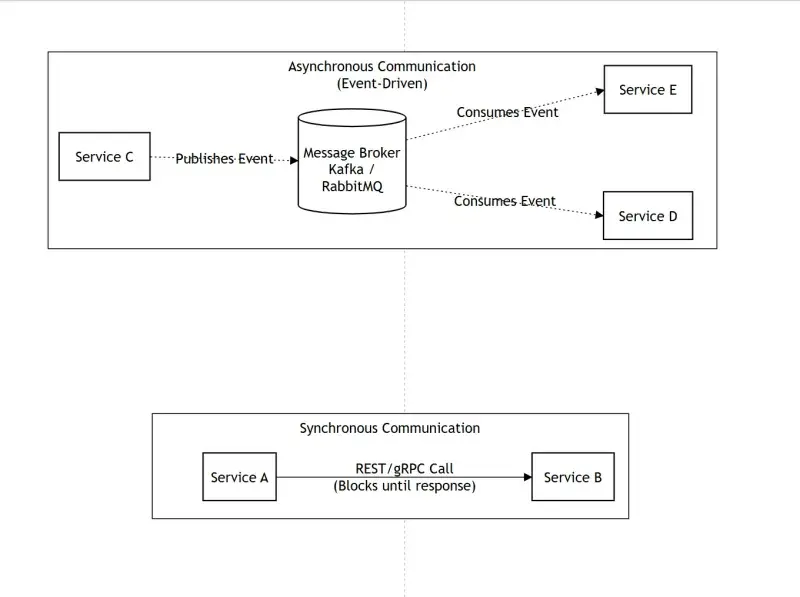
Microservices communicate primarily through synchronous or asynchronous interactions.
Synchronous communication
Synchronous communication commonly uses:
- REST
- HTTP
- gRPC
One service sends a request and waits for a response.
This approach is useful when an immediate answer is required, such as:
- Validating a customer
- Checking availability
- Retrieving product information
- Authorizing access
- Calculating a current price
Asynchronous communication
Asynchronous communication uses events, queues, and message brokers.
One service publishes an event or message, and other services consume it independently.
This can reduce direct dependencies and help absorb traffic spikes. However, it does not automatically make a system resilient.
Reliable asynchronous processing still requires careful handling of:
- Retries
- Duplicate messages
- Idempotency
- Failed deliveries
- Dead-letter queues
- Message ordering
- Monitoring
- Consumer failures
| Communication Type | How It Works | Common Tools | Best For |
|---|---|---|---|
| Synchronous | A service sends a request and waits for a response | REST, HTTP, gRPC | Immediate decisions, validation, and direct queries |
| Asynchronous | A service publishes an event and consumers process it independently | Kafka, RabbitMQ, queues, event buses | Background workflows, notifications, and event-driven processing |
Both styles are useful.
A mature microservices architecture often combines them based on the requirements of each workflow.
Synchronous REST Communication Example
A common synchronous example is a Cart Service checking product or inventory information from a Catalog Service.
The flow may look like this:
- The user adds an item to the cart.
- The Mobile App sends a request to the system entry point.
- The API Gateway routes the request to Cart Service.
- Cart Service calls Catalog Service using REST.
- Catalog Service returns the requested availability or product information.
- Cart Service updates the cart.
This approach works when Cart Service needs an immediate answer before continuing.
The trade-off is that Cart Service becomes temporarily dependent on Catalog Service.
If Catalog Service is slow or unavailable, the cart request may also become slow or fail unless the system uses appropriate timeouts, fallbacks, caching, or other resilience mechanisms.
Asynchronous Event-Driven Communication Example
A common asynchronous example is order processing.
A simplified flow may look like this:
- The user places an order.
- Order Service validates the request and stores the order with a pending status.
- Order Service publishes an
OrderCreatedevent. - Kafka or another message broker stores and distributes the event.
- Payment Service consumes the event and begins payment processing.
- Shipping Service may create a pending fulfillment record, but it does not ship the order yet.
- Notification Service sends an “order received” or “payment pending” message rather than a final confirmation.
- Later events such as
PaymentSucceeded,PaymentFailed,InventoryReserved, orInventoryUnavailabledetermine whether the order is confirmed, cancelled, or refunded.
This pattern is useful when several services need to react to the same business event.
Once the order is created:
- Payment processing can begin.
- Pending fulfillment information can be prepared.
- Analytics can record the order attempt.
- A preliminary customer notification can be sent.
The system should not present the order as paid, confirmed, or ready for shipping until the required payment and inventory outcomes are known.
Real-World E-Commerce Microservices Architecture Diagram
An e-commerce platform is one of the clearest examples of microservices architecture because it contains multiple business capabilities that can be separated into independent services.
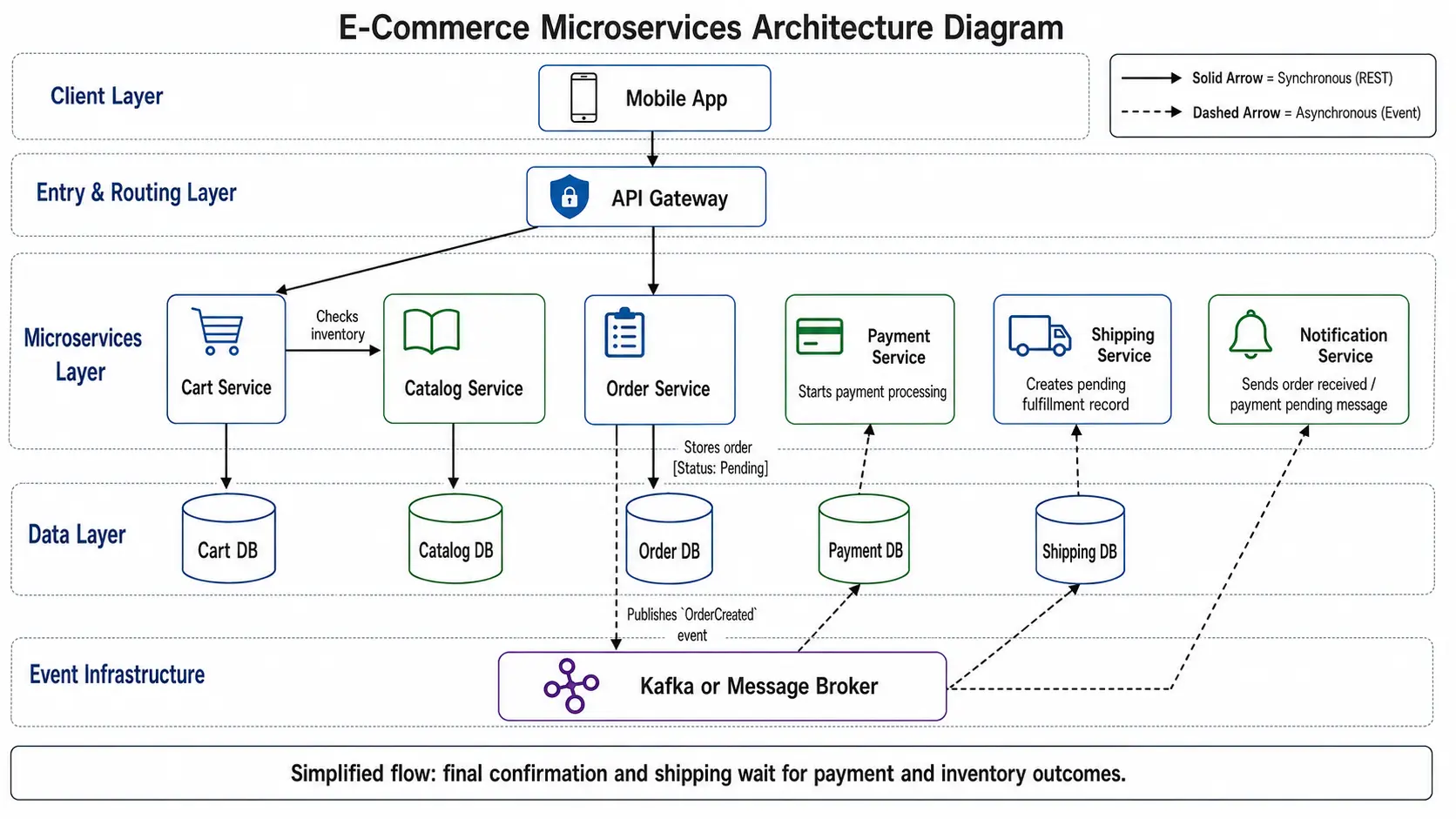
In this simplified architecture:
- The Mobile App sends requests to the API Gateway.
- The API Gateway routes requests to Cart Service and Order Service.
- Cart Service communicates with Catalog Service to check product or inventory information.
- Order Service stores the order with a pending status.
- Order Service publishes an
OrderCreatedevent to Kafka or another message broker. - Payment Service consumes the event and begins payment processing.
- Shipping Service may create a pending fulfillment record but waits for the required payment and inventory outcomes before shipment.
- Notification Service may send an “order received” or “payment pending” message before final confirmation.
Simplified-flow note: This diagram shows how services can react to an order event. A production checkout normally uses later events such as
PaymentSucceeded,PaymentFailed,InventoryReserved, orInventoryUnavailablebefore confirming or shipping the order.
This design separates responsibilities and allows services to be operated more independently.
For example, if order traffic increases during a sale, Order Service may be scaled without scaling every other service.
If payment processing requires additional controls, Payment Service can be improved without rewriting the complete application.
Independent scaling and deployment still depend on good service boundaries, automated testing, observability, and operational maturity.
Monolithic vs Microservices Architecture Diagram
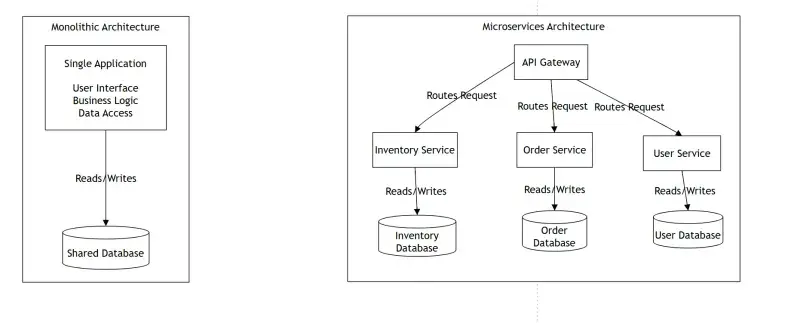
A monolithic architecture places the user interface, business logic, and data-access layer inside one primary deployable application.
That application commonly uses one shared database.
A microservices architecture separates the application into independently owned services. Each service owns its logic and controls its data boundary.
Key Differences Between Monolithic and Microservices Architecture
| Feature | Monolithic Architecture | Microservices Architecture |
|---|---|---|
| Application Structure | One primary deployable application | Multiple independently owned services |
| Database | Commonly one shared database | Services control their own data boundaries |
| Deployment | The application is usually deployed together | Services can be deployed independently when properly designed |
| Scaling | The complete application is commonly scaled | Individual services can be scaled based on workload |
| Complexity | Usually simpler at the beginning | Introduces distributed-system complexity |
| Failure Isolation | One failure can affect a large part of the application | Failures may be isolated when dependencies are designed carefully |
| Team Ownership | Teams often work in one shared codebase | Teams may own separate business services |
| Technology Choice | Commonly one main technology stack | Different technologies may be used when justified |
A monolithic diagram is often easier to understand because the application is represented as one main unit.
A microservices diagram contains more moving parts because it must show network communication, service boundaries, data ownership, and infrastructure components.
Neither architecture is automatically better.
The appropriate choice depends on system complexity, team structure, operational maturity, scaling requirements, and business needs.
For a deeper comparison, read Microservices vs Monolithic Architecture.
When to Use a Microservices Architecture Diagram
Use a microservices architecture diagram when designing, documenting, or explaining a distributed system.
It is especially useful when:
- Building an e-commerce platform
- Designing a SaaS application
- Migrating from a monolith to microservices
- Planning event-driven architecture
- Explaining service boundaries to a team
- Preparing for a system design interview
- Documenting production architecture
- Reviewing dependencies before scaling
- Onboarding engineers into a complex platform
- Comparing alternative architecture decisions
A diagram reduces ambiguity and makes architectural decisions easier to review.
Different diagrams can represent different views of the same system.
For example:
- A logical diagram shows services and business boundaries.
- A communication diagram shows requests and events.
- A deployment diagram shows containers, clusters, regions, or environments.
- A data diagram shows ownership and synchronization.
- A sequence diagram shows the steps in one business workflow.
Do not try to place every architecture view inside one image.
Choose the level of detail that matches the purpose of the diagram.
Common Mistakes in Microservices Architecture Diagrams
A microservices diagram should be simple, accurate, and easy to understand.
Many diagrams become confusing because they show too much information or mix different abstraction levels.
Common mistakes include:
- Showing every internal class or function
- Connecting every service to the same shared database
- Allowing services to modify each other’s private data directly
- Failing to label communication types
- Mixing infrastructure and business logic without clear boundaries
- Omitting the system entry point or routing layer when one exists
- Showing asynchronous event flows without displaying the queue, broker, or event bus that carries them
- Using unclear arrows without explaining request direction
- Drawing services without clear ownership
- Showing low-level deployment details in a high-level logical diagram
- Hiding important external dependencies
- Failing to show significant queues or databases
- Mixing current architecture with planned architecture without labels
- Using different shapes or arrows without a legend
A good diagram should help the reader understand the selected architecture view quickly without overwhelming them.
Best Practices for Creating Microservices Architecture Diagrams
To create a useful microservices architecture diagram, focus on clarity before decoration.
Use these best practices:
- Start with clients and system entry points.
- Show the main entry point clearly, whether it is an API Gateway, ingress, backend entry service, or another routing layer.
- Group services by business capability.
- Show service data ownership clearly.
- Avoid implying that services can freely modify each other’s data.
- Label arrows with the communication type.
- Use solid arrows for synchronous calls.
- Use dashed arrows for asynchronous events.
- Show the message broker when events or queues are part of the flow.
- Avoid unnecessary implementation details.
- Keep the diagram readable on desktop and mobile screens.
- Use consistent shapes, labels, fonts, and spacing.
- Separate business services from infrastructure components.
- Add a legend when the diagram uses different arrow styles.
- Label simplified workflows clearly.
- Distinguish current-state and future-state diagrams.
- Use consistent terminology across every diagram on the website.
The best diagrams are simple enough for beginners while remaining accurate enough for engineers.
Top Tools to Draw Microservices Architecture Diagrams
You can create microservices architecture diagrams using visual tools or diagrams-as-code tools.
Popular options include:
- Draw.io or diagrams.net for free architecture diagrams
- Excalidraw for quick hand-drawn diagrams
- Lucidchart for collaborative and enterprise diagramming
- Mermaid.js for diagrams as code inside documentation
- PlantUML for text-based technical diagrams
- Miro for collaborative whiteboarding
- Structurizr for C4-model architecture diagrams
Visual tools are useful when you need precise manual layout.
Diagrams-as-code tools are useful when diagrams need to:
- Live inside a repository
- Be reviewed through pull requests
- Change alongside code
- Remain reproducible
- Be generated automatically
For engineering teams, Mermaid.js, PlantUML, and Structurizr can be especially useful because architecture documentation can remain version controlled.
Beginner-Friendly Checklist for Drawing Microservices Diagrams
Before sharing a diagram with your team or using it in a system design interview, review it with this checklist.
- The edge is defined: Did you include the client layer and clearly show the system entry point, such as an API Gateway, ingress, backend entry service, or another routing layer when one exists?
- Business boundaries are clear: Is each service labeled by a business capability, such as Order Service or Payment Service, rather than a generic technical function?
- Data ownership is visible: Does each service clearly control its data boundary using a database, schema, collection, or another appropriate mechanism?
- Cross-service database access is avoided: Does the diagram avoid showing services directly modifying another service’s private data?
- Communication styles are visible: Are synchronous calls and asynchronous events visually distinguishable?
- The event infrastructure is shown: If the workflow uses asynchronous communication, does the diagram show the queue, broker, or event bus carrying the messages?
- Arrows are understandable: Are direction, request type, event name, and response flow clear?
- The abstraction level is consistent: Does the diagram avoid mixing high-level business services with internal classes or server-level details?
- Important dependencies are included: Are databases, queues, external APIs, or third-party systems shown when they materially affect the workflow?
- The diagram remains readable: Have you removed details that do not help explain the selected architecture view?
Conclusion: Mastering Microservices Architecture Diagrams
A microservices architecture diagram helps teams understand how a distributed application is structured.
It can show:
- Clients
- Entry points
- API Gateways
- Business services
- Service-owned data
- Synchronous calls
- Asynchronous events
- Message brokers
- External dependencies
For software engineers and system architects, learning how to read and create these diagrams is important for designing distributed systems and communicating architecture decisions.
Whether you are building an e-commerce platform, SaaS product, or enterprise application, a clear diagram can help you:
- Plan service boundaries
- Identify dependencies
- Explain communication flows
- Reduce unnecessary coupling
- Review data ownership
- Document architectural decisions
The best diagrams are not the most complicated diagrams.
They are the diagrams that clearly explain the selected system behavior, show meaningful ownership boundaries, and help teams make better engineering decisions.
To understand what each part of the diagram does in a production system, read Microservices Architecture Components Explained With Examples.
Related Articles
- What Are Microservices? A Simple Explanation for Beginners
- API Gateway in Microservices Architecture Explained
- Microservices vs Monolithic Architecture
Frequently Asked Questions About Microservices Architecture Diagrams
What is a microservices architecture diagram?
A microservices architecture diagram is a visual representation of an application built from independently owned services.
It shows how clients, entry points, services, service-owned data, message brokers, and external systems communicate with each other.
Why is an API Gateway important in microservices architecture?
An API Gateway can provide one controlled entry point for client requests.
It can route traffic to the appropriate service and handle edge concerns such as authentication, rate limiting, access logging, API versioning, and response aggregation.
Not every microservices system requires an API Gateway, but it is common when several external clients need stable access to multiple backend services.
Should every microservice have its own database?
Each microservice should generally own and control its data, but this does not always require a completely separate physical database server.
Data isolation may use separate databases, schemas, collections, tables with controlled ownership, or other boundaries.
The important rule is that one service should not directly modify another service’s private data.
What is the difference between synchronous and asynchronous communication?
Synchronous communication means one service sends a request and waits for a response, commonly through REST or gRPC.
Asynchronous communication means a service publishes an event or message and consumers process it independently through a queue or message broker.
Asynchronous communication reduces direct timing dependencies, but reliable processing still requires retries, idempotency, failed-message handling, and monitoring.
Is Kafka required for microservices architecture?
Kafka is not required for every microservices architecture.
It is useful when a system needs event streaming, high-throughput asynchronous processing, durable event logs, or several consumers reacting to the same events.
Smaller systems may use RabbitMQ, a cloud queue, direct API calls, or no message broker at all.
What is a common example of microservices architecture?
An e-commerce platform is a common microservices example because it can separate users, products, carts, orders, payments, inventory, shipping, and notifications into clear business capabilities.
What is the main difference between monolithic and microservices architecture?
A monolithic architecture builds and deploys the application primarily as one unit.
Microservices architecture divides the application into independently owned services that communicate through APIs or messages and can often be deployed and scaled separately.
How do you draw a microservices architecture diagram?
Start with the client layer and the main system entry point.
Group services by business capability, show service data ownership, and label communication paths as synchronous or asynchronous.
Include only the components needed to explain the selected architecture view.
What should a microservices diagram include?
A microservices diagram should show the components relevant to its purpose.
These may include clients, an API Gateway or another entry point, business services, service-owned data, message brokers, communication arrows, external dependencies, and clear labels.
A high-level diagram should include only the details needed to explain the selected architecture view.